EVENTIA, the system you built
A working website, deployed and tested, where a hotel lists an event and a traveller books across tickets, rooms and extras in one go.
A website, not an app you install. A hotel uses it to publish an event and set up what can be booked. A traveller uses it to browse events, see what is actually left, and book several things at once. Staff use it at the door to scan tickets.
The whole design comes from one finding: both sides must read the same information at the same moment.
Who uses it, and what each person can do
The organiser
Someone at the hotel. Creates the property, publishes events, sets up the inventory, and watches a live dashboard of bookings and remaining stock.
The traveller
Browses published events without needing an account. Signs in to book. Books across tickets, rooms and add-ons in one go and gets a QR code.
Front desk staff
Opens the check-in screen on a phone at the door, scans the QR code, and admits the guest. No scanner hardware needed.
What you can actually book
This is the part that makes the system different from everything reviewed in Chapter 2. Three kinds of thing, all bookable in one basket:
| Kind | Examples | Why it is in the same table as the others |
|---|---|---|
| Ticket | General entry, VIP entry, early bird | Because they behave identically. Each has a price, a total, a remaining count, and each must be decremented safely when booked. The guest experiences them as different things. The system does not need to. |
| Room | Deluxe double, sea view twin | |
| Add-on | Dinner package, drinks package, parking slot |
The screens
Twelve of them. Every one works at phone width, which Chapter 6 verified at 375, 768 and 1440 pixels.
The public and traveller side
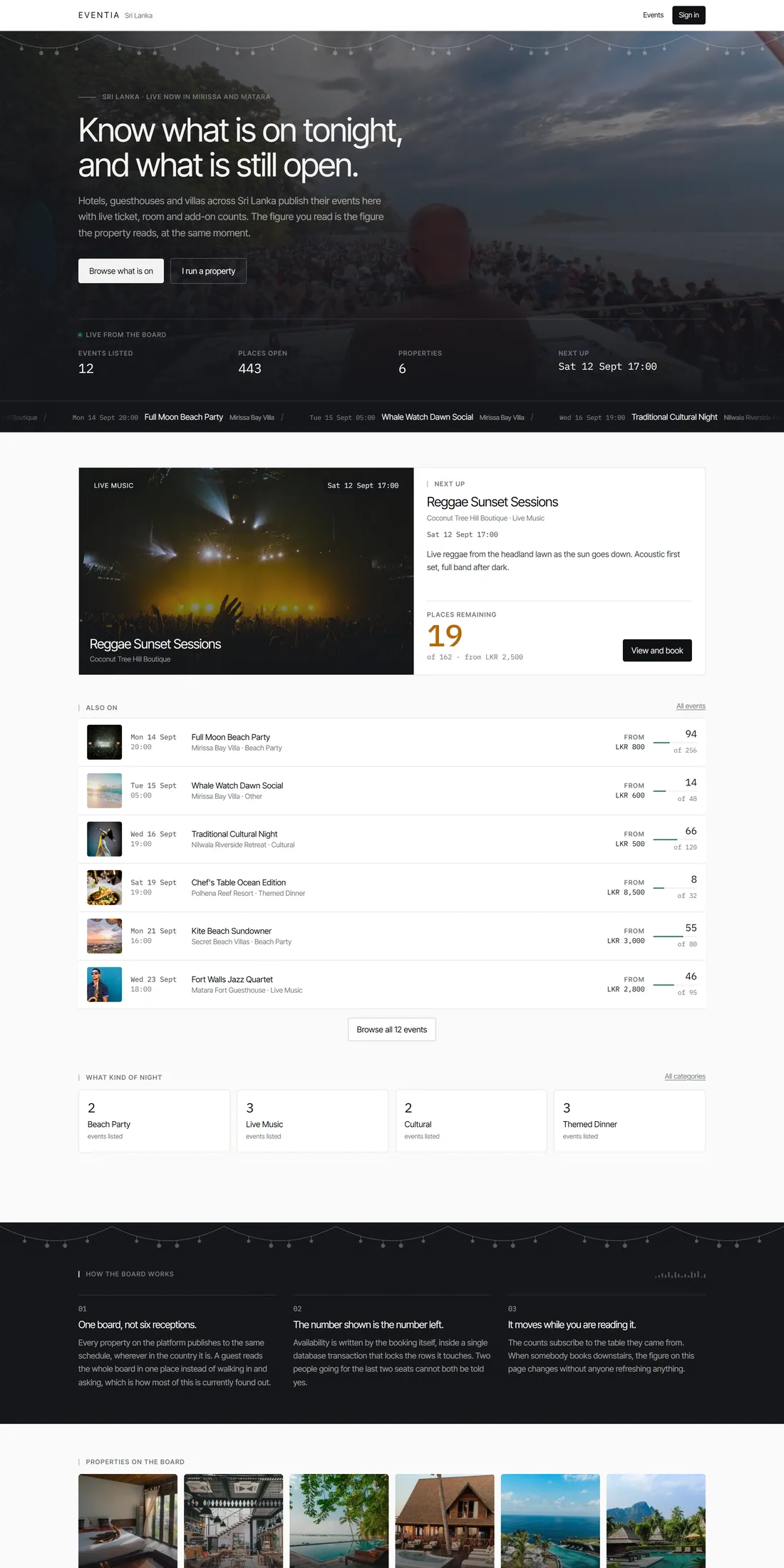
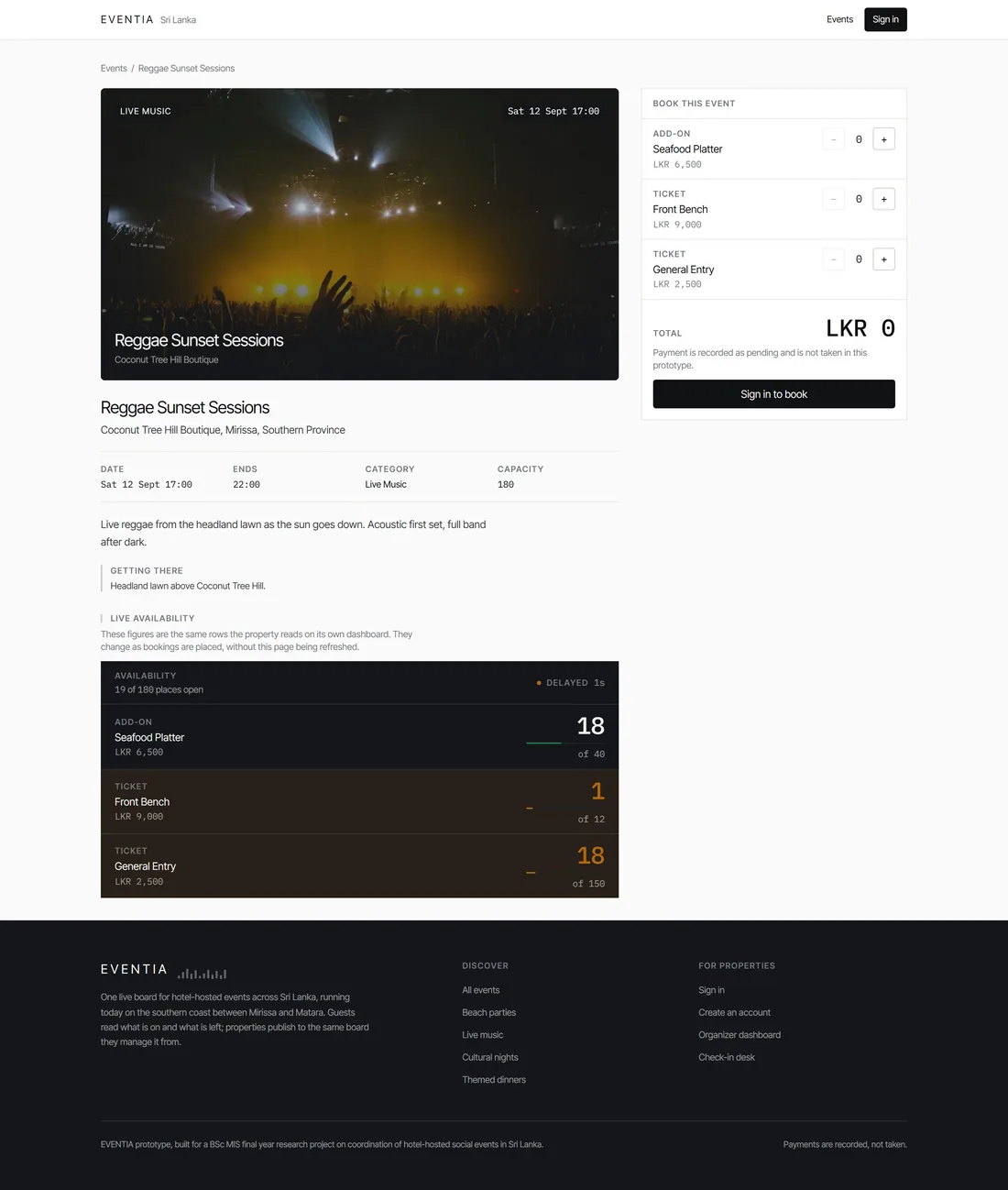
The rest of the traveller side: 2. Event browse with date and category filters. 4. The booking flow, selecting quantities and reviewing the total. 5. The confirmation with the QR code. 6. A list of the traveller's own bookings.
The organiser side
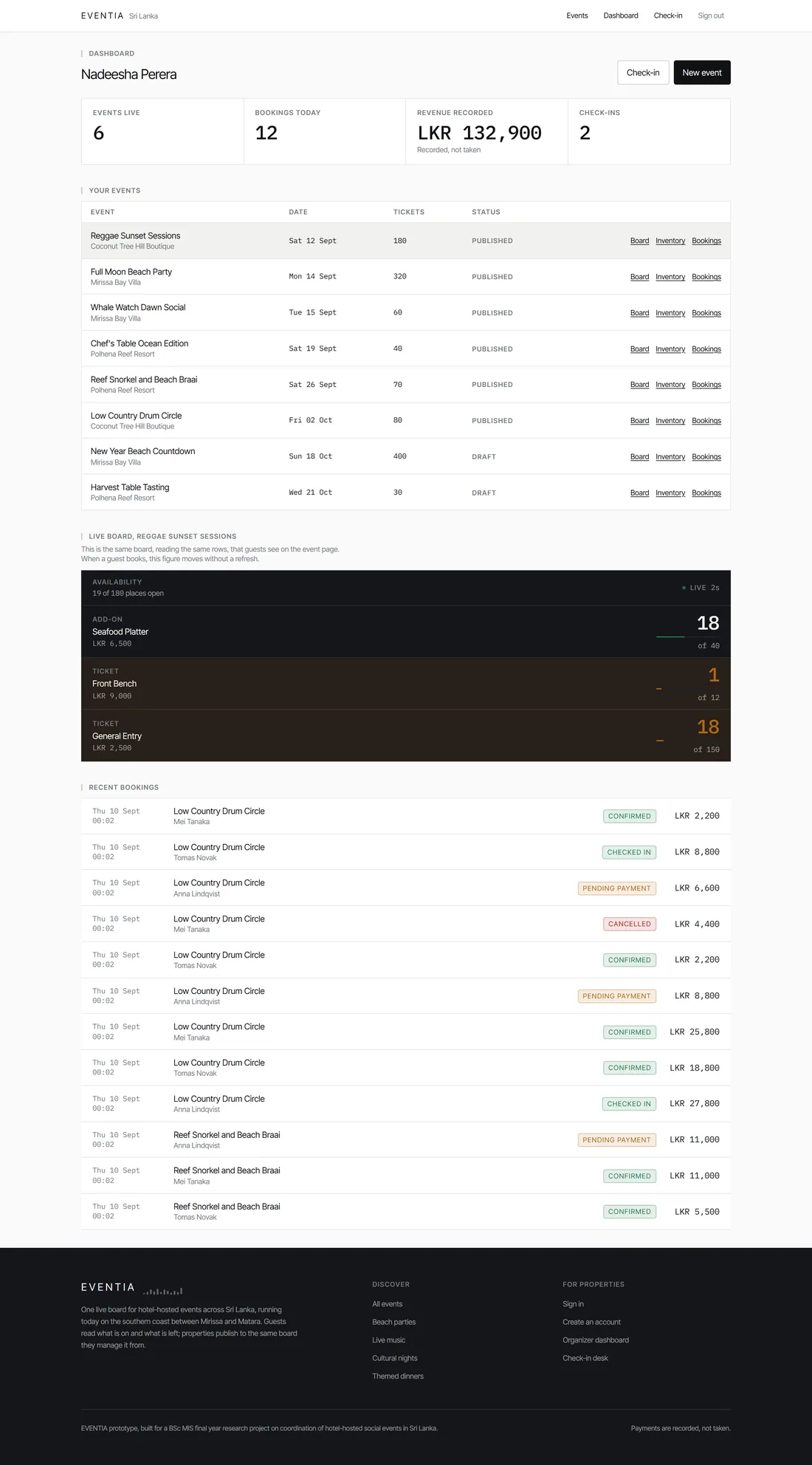
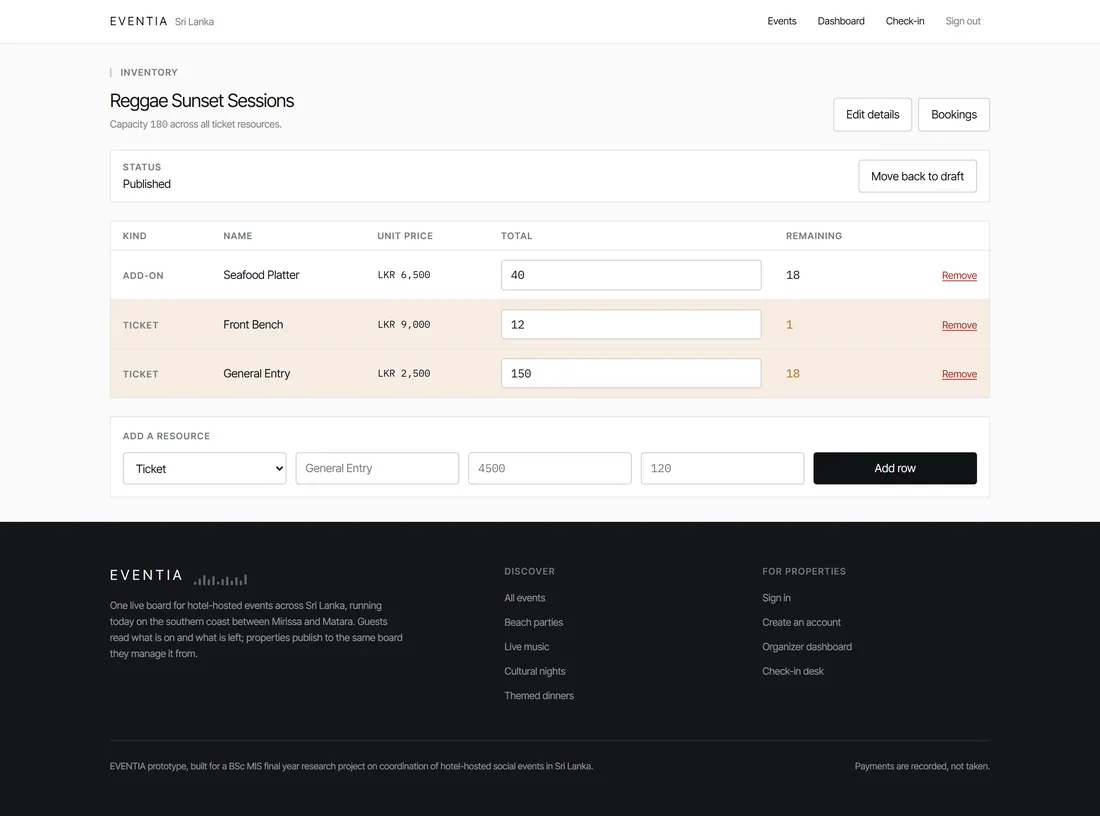
The rest of the organiser side: 7. Login with role-aware redirect. 9. The event create and edit form. 11. The bookings list for one event.
The four workflows, step by step
A. An organiser publishes an event
- Create the event as a draftTitle, description, category, start and end time, venue note, capacity. Nothing is public yet.
- Define the inventoryAdd resources: ticket kinds, room allocations, add-ons. Each gets a price and a total quantity. Remaining is set equal to total automatically.
- PublishThe system checks that capacity is set and at least one resource exists.
- If the check failsIt names the missing field and the event stays a draft. An event cannot go public with nothing bookable on it.This is the alternate flow. Examiners ask for alternate flows.
- It goes publicIt appears in browse, with live availability attached.
B. A traveller books
- BrowsePublished events only. Filter by date range and category. No account needed to look.
- Open an eventSchedule, price, what is included and the live remaining counts, all in one view. No phoning the hotel to find out.
- Pick quantities across resourcesTwo entry tickets, one room, one parking slot, in one basket. The running total updates.
- Confirm, and the transaction runsRows claimed, availability checked, capacity ceiling checked, quantities decremented, booking and line items written, QR token generated. All as one indivisible act.
- If anything is shortThe whole thing aborts. Nothing partial is written, and the message names which resource ran out, so only that line needs changing.
- ConfirmationItemised lines, a total computed by the server, a pending payment status because payment is out of scope, and the QR code.
C. A number changes on everyone's screen at once
- Both screens subscribeThe traveller's event page and the organiser's dashboard both subscribe to changes on the inventory table.
- Somebody booksAnywhere, in any session.
- The database publishes the changeNobody polled. Nobody refreshed.
- Every subscriber gets the new numberMeasured at 265 milliseconds typically, 580 at the slow end, against a 2 second target.
- If the live channel failsThe page falls back to asking periodically and shows an indicator that the figures may lag. Showing stale numbers silently would recreate the exact problem the research identified.
D. Check-in at the door
- Open the check-in view for the eventOn a phone.
- Scan or type the tokenThe system finds the booking.
- Unknown, or wrong eventRefused, with the reason shown.
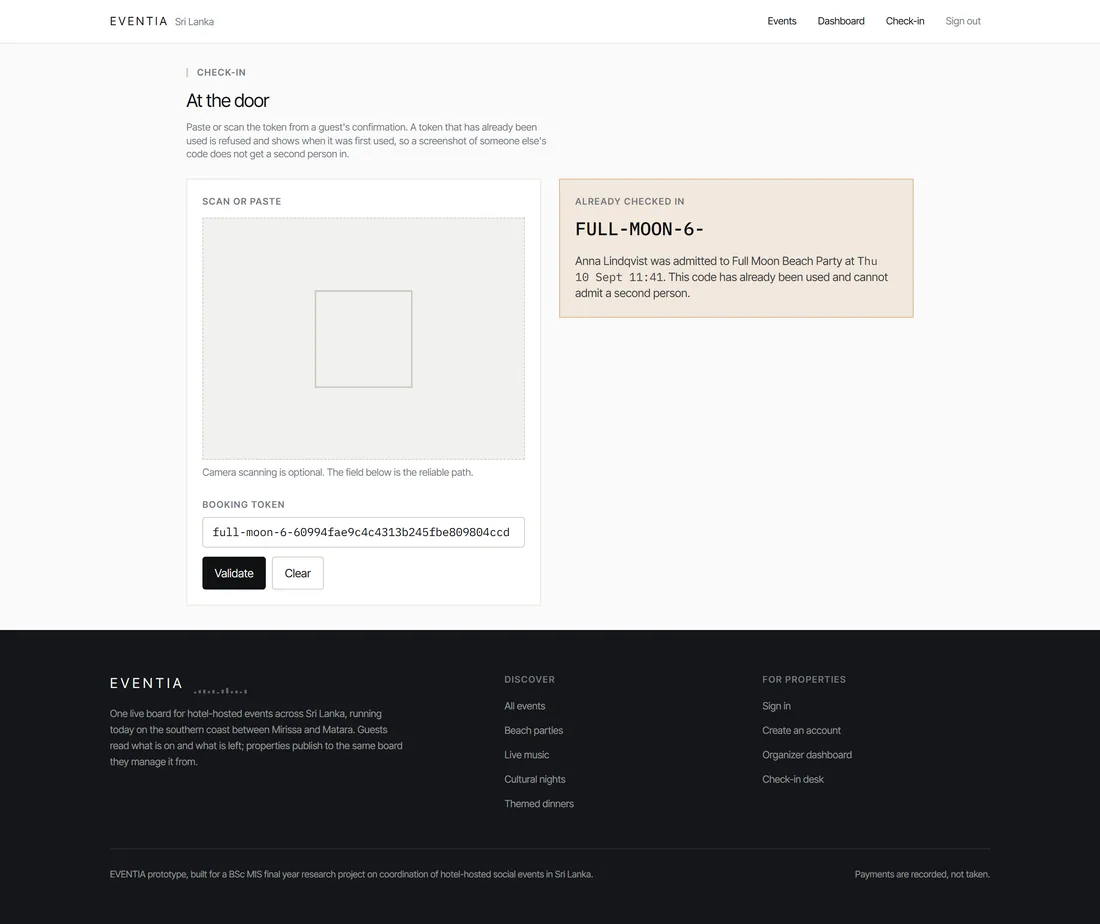
- Already usedRefused as a replay, and the original check-in time is shown.
- ValidAdmitted. Status set to checked in, timestamp recorded, booking contents displayed so staff know what the guest paid for.
- The useful by-productThose timestamps become attendance data. An organiser can finally compare bookings taken against guests who actually turned up.
How to demo it
Open the organiser dashboard on one screen. Open the same event as a guest on another, a second window or your phone. Then book something from the guest side.
The number moves on both screens at once, with nothing refreshed.
That single moment demonstrates the unified information layer better than any slide you could make. If you only show one thing, show this.
A four-minute demo script
- Open the landing pageSay: this is what a traveller sees. Real events, real dates, real remaining counts.
- Open one eventPoint at the availability board. Say: everything a traveller needs to decide is in one view. Schedule, price, what is included, and what is actually left. Right now they would have to check Instagram, the hotel's page and then phone the desk.
- Sign in as an organiser and open the dashboardPoint at the same board. Say: this is the same component reading the same rows. The hotel and the guest are looking at one record, not two copies.
- Book from the guest windowWatch the dashboard move without refreshing. Say: measured at 265 milliseconds typically. This is the H3 finding working.
- Show the confirmation and the QR codeSay: the token is a long random value, not a number anyone could guess.
- Scan it on the check-in screen, then scan it againFirst scan admits the guest. Second is refused as a replay, showing when it was first used. Say: that is test case TC-07.
- If there is time, mention the concurrency testSay: the thing I cannot show you live is 20 people booking at the same instant. That is TC-05, and the transcript is in Appendix D. Exactly 10 succeeded, 10 were refused, and the remaining figure landed on zero.
Getting in
| Deployed at | eventia-mirissa.vercel.app |
| Organiser accounts | organizer.one@example.com organizer.two@example.com |
| Traveller accounts | tourist.one@example.com tourist.two@example.com tourist.three@example.com |
| Password | You do not need to type one. The login page has one-click demo sign-in buttons for these seeded accounts. |
Open the deployed link yourself a day early and check it works. Check the events are still there and the dashboard loads.
Free hosting can go to sleep or expire. Discovering that in the room is the worst possible moment. If it is down, the project also runs on your own machine from the project folder, and the seed script reloads the data.
Have the screenshots ready as a fallback either way. Every screen was captured at three widths and they are in the evidence folder.
What it deliberately does not do
| Not built | Why, and this is the answer to give |
|---|---|
| Payment processing | Declared out of scope in Chapter 1. The research question is about information coordination, not transactions. Bookings record a total and are marked pending payment, so the data model is complete and a payment step could be added without changing it. |
| Email or SMS notifications | Out of scope. Adds operational complexity without testing anything about the research question. |
| Reviews and ratings | Out of scope. Interesting commercially, irrelevant to whether unified information improves coordination. |
| A native mobile app | Out of scope. The web application is fully responsive and works on a phone, which is what the traveller theme about mobile form factor actually required. |
| Multiple languages | Out of scope for the prototype. |
| Refunds and cancellation flows | Beyond a simple status change, out of scope. |
Never say "I did not have time for payments". Say "payment processing is declared out of scope in Section 1.10, because the research question concerns information coordination rather than transactions".
The first sounds like a gap. The second sounds like a boundary you drew on purpose, which it is.
If they ask you
Show me the system.
Run the four-minute script above. Landing page, one event, the organiser dashboard, then book from the guest side and let them watch the number move on both screens.
Do not narrate every screen. Narrate the one moment that proves the thesis.
Could this handle a real hotel tomorrow?
Functionally, most of the way. It publishes events, takes multi-resource bookings safely under concurrent load, enforces access control at the database, and validates tickets at the door.
Two things would be needed before commercial use. Payment processing, which is declared out of scope. And re-verifying the concurrency guarantee at a larger scale, because it was tested at the scale a single hotel event produces rather than many properties on a peak night. That second point is a named future recommendation in Chapter 7.
What happens if two people book the last ticket at the same moment?
One succeeds and one is refused, with the refusal naming the resource that ran out. There is no scenario where both succeed.
The check and the decrement happen inside a single database transaction. The rows are claimed with a row lock before the check, so there is no window between reading the availability and changing it. Test case TC-05 fired 20 simultaneous requests at a resource holding 10 units and got exactly 10 and 10, with the remaining figure landing on zero.
Why is it a website rather than a mobile app?
Three reasons. It needs no installation, which matters for a traveller who will use it for three days and then never again. It is one codebase serving both audiences over one data model, which is what allows both sides to read identical information. And it removes an app store and a per-platform build from a project whose adoption constraint is cost and simplicity.
The traveller theme about mobile form factor, at 25 percent, is satisfied by the responsive layout, which Chapter 6 verified across three breakpoints with no horizontal overflow.
EVENTIA is a responsive web application built with Next.js and a managed PostgreSQL database. An organiser publishes an event and defines its inventory across tickets, rooms and add-ons. A traveller browses, opens an event, sees live remaining availability and books across several resource kinds in one atomic transaction, receiving a QR code. The organiser dashboard and the traveller event page subscribe to the same inventory table, so a booking made by one immediately changes the figure the other sees, with no refresh. At the door, staff validate the QR token, and a token presented twice is refused as a replay.